AU & NZ Medical Students & JMOs

Clinical medicine,
forged together.

The first student-run, collaborative and open-source clinical medicine Anki project designed for Australian and New Zealand medical students and junior medical officers.

Malleus Clinical Medicine
Open-source · AU/NZ aligned · Free
Deck at a glance
8,000+
Flashcards
Open
Source & Free
AU/NZ
Curriculum Aligned
Live
Updates via AnkiHub

References
AnkiHub eTG Complete AMH Online eMedici RCH LITFL Radiopaedia
Inside a Malleus Card

Every feature,
by design, for learning.

Scroll to explore what makes Malleus cards different.

Anki card screenshot
01

Randomised elements to enhance learning

Some cards use randomised elements, so you do not pattern match and instead tests understanding

02

Question-Answer card style

Cards use a clean cloze deletion question-answer format, forcing active recall on the single most important clinical fact.

03

Useful extra content

The extra field gives you the clinical reasoning behind the answer — not just what, but why — so knowledge sticks beyond the exam.

04

Supporting content one click away

Direct links and content to eTG Complete, AMH Online, and other AU/NZ resources are embedded in every card — go deeper whenever you need to.

05

Comprehensive tagging structure

Every card is tagged by rotation, yield, and subject. Study only what is relevant to where you are right now in your training.

Why Malleus

Built by students,
for students

Every aspect of Malleus is shaped by the people who use it — a living deck that grows with every contribution and stays aligned with Australian clinical practice.

Anki Addon

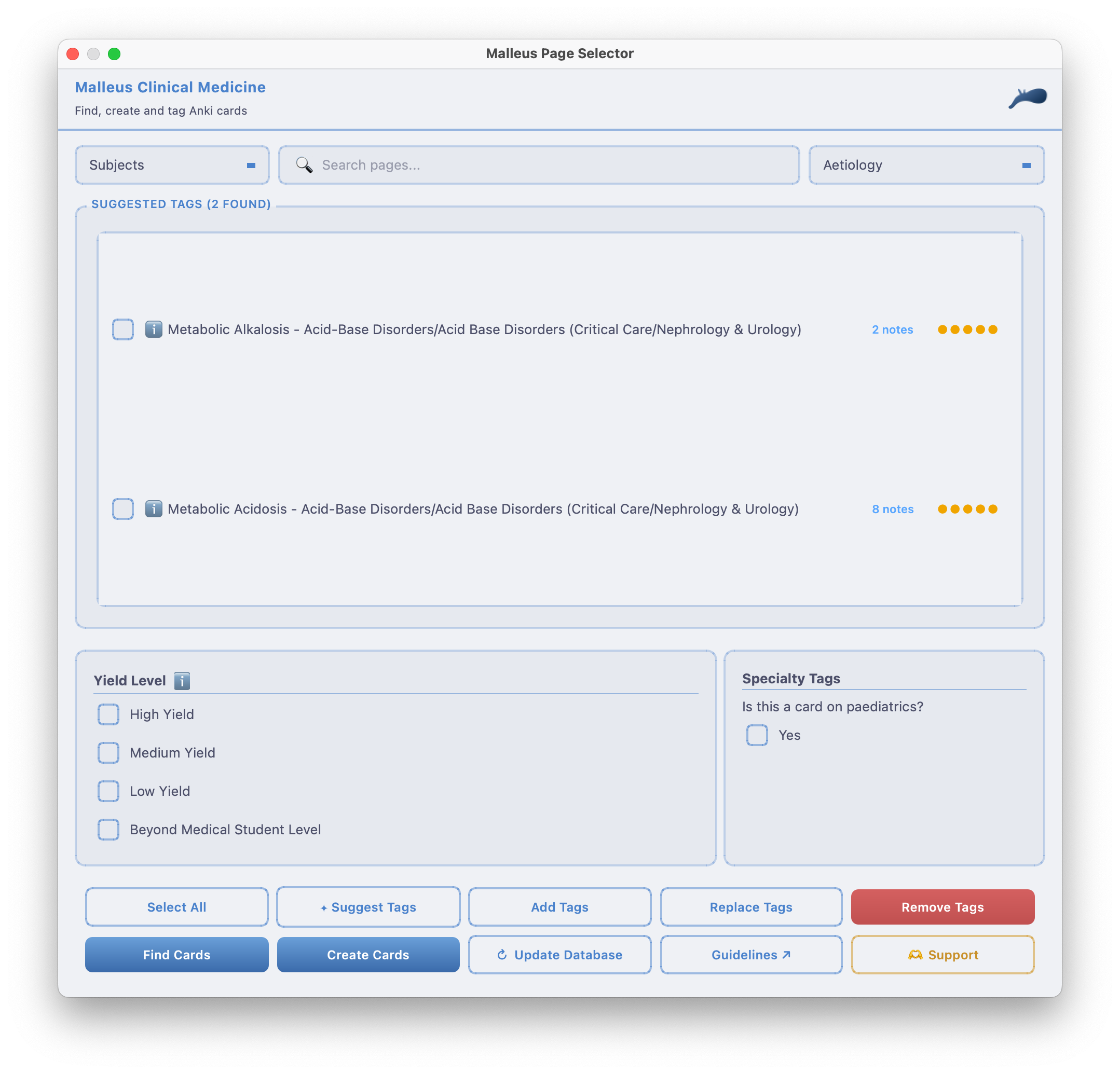
A dedicated Anki addon integrates with the Malleus Notion database. Search cards, find existing notes with matching tags, and create new cards with proper tagging — all without leaving Anki.

Install Addon (620451841) ↗
Collaborative & Maintained

Cards are created, reviewed and updated by a community of medical students and junior doctors. No stale content — the deck evolves with feedback.

AU/NZ Curriculum Aligned

Content references Australian guidelines — eTG Complete, AMH, and local clinical standards — rather than US-centric resources.

Completely Free & Open Source

Malleus is free to use and contribute to. Hosted on AnkiHub, anyone can suggest card edits and improvements. AnkiHub offers full scholarships so the plugin costs nothing.

Sort by Rotation & Subject

A detailed tagging structure lets you filter cards by rotation, subject, or topic — so you can study exactly what is relevant to where you are in your training.

Active Community

A Discord server, Facebook group, and AnkiHub community of like-minded students share tips, resources, deck updates, and even run a Malleus Cup competition.

The Malleus Note Type

Built for clinical medicine

See how the Malleus note type structures clinical information for effective spaced repetition learning.

Malleus Anki Addon

Your deck,
supercharged

The Malleus Anki Addon connects directly to the Malleus Notion database so you can manage cards without ever leaving Anki. Search, find, and create — all in one place.

  • Search the Malleus Notion database from within Anki's browser or editor
  • Find existing cards with matching subject and disease tags instantly
  • Create new cards with correct Malleus tagging — select the right subtag or use Main Tag
  • Access via the "Malleus" button in the browser toolbar or the add card dialogue
Malleus Anki Addon screenshot
Getting Started

Up and running
in minutes

Follow these steps to install the deck and start reviewing clinical medicine flashcards today.

  1. 1
    Install Anki

    Download and install Anki (free) for Windows, macOS, or Linux. Anki is the spaced-repetition engine that powers the deck.

    Download Anki ↗
  2. 2
    Create a free AnkiHub account

    Malleus is distributed through AnkiHub which handles deck syncing and community suggestions. Create a free account — AnkiHub offers full scholarships so the plugin costs nothing.

    Go to AnkiHub ↗
  3. 3
    Install the AnkiHub addon

    Install the AnkiHub addon (code: 1322529746) to connect Anki to AnkiHub. This keeps your deck automatically up to date with community improvements.

    Get AnkiHub Addon ↗
  4. 4
    Subscribe to Malleus on AnkiHub

    Search for "Malleus Clinical Medicine" on AnkiHub and subscribe. The deck will download automatically into your Anki library.

    Find the Deck ↗
  5. 5
    Install the Malleus Anki Addon

    Optionally install the Malleus Anki Addon (code: 620451841) to search and create cards directly from within Anki using the Malleus Notion database.

    Get Malleus Addon ↗
  6. 6
    Read the full guide

    The Notion guide covers the tagging structure, how to make card suggestions, and how to customise the deck to your year and rotation.

    Open Getting Started Guide ↗
Submission Guidelines

Want to contribute? Read the submission guidelines before suggesting cards — covers format, tagging structure, and quality standards.

View Guidelines →
Join the Community

Get help, share resources and stay up to date with deck updates by joining the Malleus Discord and Facebook group.

Join Discord →
Support the Project

Malleus is made by students, for students. Donations help cover hosting and project costs so we can keep improving the deck.

Donate →
All Resources

Everything you need

All the key links for the Malleus project in one place.